Contents
1. Brief Description
2. Operation and Control Description
3. Parametrization
1. Brief Description
The Parallel Station object is used to model stations for the parallel, simultaneous machining of multiple parts.
2. Operation and Control Description
The properties of the Parallel Station correspond to those of the Single Station. The Parallel Station has multiple workstations, in contrast to the single workstation of the Single Station.
Setup times occur whenever a MU with a different name than its predecessor is transferred to the Parallel Station.
Plant Simulation always transfers the MU as a whole, not continuously; that is, as soon as its “bow”- or rather, its booking point—is located on the Parallel Station, the entire MU is on it.
3. Parametrization
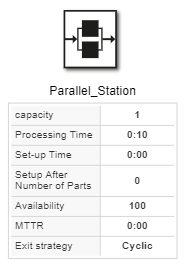
Figure 1 - Parallel Station
|
Parameter
|
Required
|
Description
|
Name
|
no
|
Name of the object
|
Capacity
|
yes
|
Specifies the number of processing stations in the parallel station.
|
Processing time
|
no
|
The time during which the MU remains on the object for processing. It refers to the time interval between setup for this MU type and the point at which it transfers the material flow object to its successor.
|
Set-up time
|
no
|
The time it takes to set up the object for processing a different MU type.
|
Setup After Number of Parts
|
yes
|
Number of parts that must enter the station for station setup to begin.
|
Availability
|
yes
|
Station availability in %
|
MTTR
|
no
|
Dauer einer Störung (Mean Time To Repair)
|
Exit strategy
|
yes
|
Cyclical: MUs are transferred cyclically to successors according to the sequence,
Start at Successor 1: MU are always transferred to the successor of the object with edge number 1
|
Comment
|
no
|
Text field for comments on the object
|
|
© SimPlan AG - Hanau District Court, Commercial Register (Part B) 6845 - info@simplan.de - www.simplan.de/en