When entering times in SimLite, please note the following:
•When entering seconds, the value is automatically converted to minutes and hours. For example, entering 120 will automatically be displayed as 2:00.
•Leading zeros in time entries are automatically removed. Therefore, 1:00 should be read as one minute.
•Times can be entered in the format DD:HH:mm:ss.SS, where DD stands for days, HH for hours, MM for minutes, ss for seconds, and SS for fractions of a second
•The entry of letters or special characters is automatically suppressed
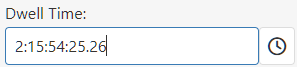
Figure 1 - Time Parameters
The stop watch function can be used to record and save measurement series.
© SimPlan AG - Hanau District Court, Commercial Register (Part B) 6845 - info@simplan.de - www.simplan.de/en