Contents
2. Operation and Control Description
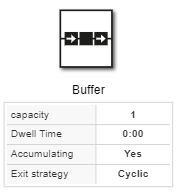
The Buffer object is used to temporarily store a large number of parts and then pass them on.
2. Operation and Control Description
Install a buffer between two components of your system:
•To temporarily store parts when one of the subsequent components or machines in the sequence of stations malfunctions, thereby preventing the preceding machines from stopping production.
•To continue conveying parts when the upstream components are at a standstill, thereby preventing production from coming to a halt.
If you design a buffer with sufficient capacity to cover all disruptions, this results in a complete decoupling of the corresponding system components.
Buffers can both bridge disruption periods and serve as balancing elements when transport and processing times fluctuate, causing queues to form in front of machines.
However, they cannot prevent an interruption or stoppage of the material flow in every case.
Since the buffer does not have individual processing stations, it does not need to divide the processing time—that is, the time during which the part is inside it—into small individual steps.
Instead, you can select the order in which the parts leave the buffer.
Figure 1 - Buffer |
|
© SimPlan AG - Hanau District Court, Commercial Register (Part B) 6845 - info@simplan.de - www.simplan.de/en